Siliconera Thursday, January 1, 2026 12:00 PM
We've gone through and honored all our favorites of 2025, so now what? Let's look forward! Here are the titles the Siliconera team most want to play next year: our 2026 Most Anticipated Games.
These awards represent the consensus of the Siliconera staff. For more of the year's award selections, check out our Game of the Year 2025 archive.
Pokemon Pokopia
We've been clear about how much we love Dragon Quest Builders 2, and a shift to the world of Pokemon does nothing to dampen our enthusiasm for the development team's latest effort. It looks to build (heh) on these elements and combine them with a more "cozy" approach with slow life and farming. Also? Using Ditto as a way to justify gaining abilities is clever. It can't get here fast enough!
Heroes of Might and Magic: Olden Era
The Heroes of Might and Magic franchise is beloved, but it's been subject to decades of neglect and abuse after its heyday. (Truly, only Sonic fans might be able to relate.) Olden Era seems to finally return to the formula that worked the best, and with a sharp aesthetic and smart design scope that makes us confident this game will actually finish development unlike its recent predecessors.

Winner: Fire Emblem: Fortune's Weave
Fire Emblem: Three Houses was a masterclass in worldbuilding and character design, capturing hearts of players even with somewhat middling systems and map design. Its follow-up, Engage, really worked on those mechanical elements while perhaps dropping the ball on the other stuff. So we're hopeful that Fortune's Weave can continue to build on the Three Houses world we love so much while spending just a bit more effort on making its strategic choices just a bit more meaningful. Fingers crossed! "Most Anticipated" is an honor of potential, and we hope it reaches it.
The post Siliconera's Most Anticipated Games of 2026 appeared first on Siliconera. |

Destructoid Thursday, January 1, 2026 3:52 PM
Modifying game data in My Winter Car isn't the easiest of tasks as of writing, but there's a backdoor way of tweaking the in-game stats.
This is possible all thanks to the My Summer Car Editor, or MSCEditor in short. It doesn't work flawlessly in My Winter Car (since it was not specifically developed for it), but you can still use the tool to some extent, and this guide will explain the complete process.
Table of contents
How to install the MSCEditor for My Winter Car
The basic steps for installing and using the MSCEditor for My Winter Car are the same as My Summer Car. However, it isn't fully functional (something you should keep in mind).

To alter the values, you must open the save file via the MSCEditor app. If you open it from outside, you won't be able to tweak any of the save file values properly.
Will there be a new app for My Winter Car
My Winter Car is built on the same engine as My Summer Car. Hence, there's a strong chance that we will get an exclusive editor app. However, such an app isn't available at the time of writing. If that changes, it will be easier for us to edit the save files and the values present on them.
A timeline is hard to predict since it entirely depends on the community and how quickly someone can develop the mod.
The post How to use the My Winter Car Editor and modify game data appeared first on Destructoid. |
Destructoid Thursday, January 1, 2026 1:30 PM
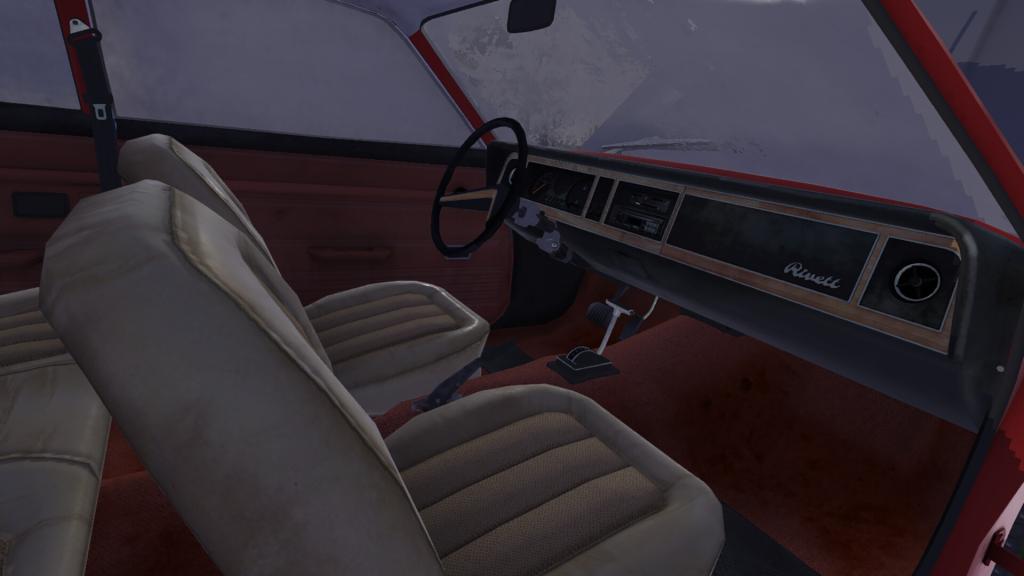
Project vehicles in My Winter Car not only differ in their condition from ready-to-drive cars, but they also have a unique VIN that you can decode and get extra information.
The VIN appears to be only applicable for vehicles that are missing parts. It's the Corris Rivett in the current build of the game, and you can find the VIN on its chassis. The same pattern could follow all future project cars that will be added in updates.
Here's how you can use the VIN once you've figured it out.
Table of contents
How to find the VIN in My Winter Car
As mentioned above, you'll need the open chassis of a vehicle to find out its VIN. It's located on top of the right-side front headlight. It appears as a tiny sticker with a bunch of information on it.
The difficulty arises when you try to decode the information. There's no possible way of decoding the VIN from directly inside My Winter Car. Thankfully, there are a few community-created solutions to mitigate the problem.
How to decode the VIN in My Winter Car
The VIN consists of a sequence of letters and numbers. The VIN will be unique for every vehicle, and differ across saves. You'll need to put the code into a decoder, and you can use third-party options like My Winter Car Database.
Enter the code into the decoder, and you'll get the complete set of specifications related to the car. This will also include every detail about the car parts and how they would look in mint condition.
While decoding the VIN is fine, it's largely a novelty. While the VIN of a car is unique, you don't necessarily have to use matching parts. You can easily use parts with different VINs to complete the Corris Rivett. However, using parts with a specific VIN will help you get that industry-grade mint finish on your car once it's completely assembled.
The post How to decode VIN in My Winter Car and how to use it appeared first on Destructoid. |
Destructoid Thursday, January 1, 2026 1:22 PM
The New Year Overdrive Evolution has arrived in FC 26 Ultimate Team, and it's an exciting upgrade to use.
While the evolution is available for free, it's not your usual cup of tea in terms of the offered upgrades. However, your chosen card will get stat upgrades, a boost to the overall rating, and new roles/playstyles. Let's look at the best evo contenders based on the offered upgrades and the requirements.
Table of contents
FC 26 New Year Overdrive Evolution requirements
Here are the requirements of New Year Overdrive Evolution in FC 26.
FC 26 New Year Overdrive Evolution upgrades
The evolution has five levels of upgrades, each with certain conditions to fulfill.
Level 1 upgrades
Level 2 upgrades
Level 3 upgrades
Level 4 upgrades
Level 5 upgrades
Level 1 upgrade requirements
Level 2 upgrade requirements
Level 3 upgrade requirements
Level 4 upgrade requirements
Level 5 upgrade requirements
Best players to use in New Year Overdrive Evolution
Here are some of my best recommendations for inclusion in the evolution.
While the upgrades are significant, you will be able to include these cards in future evolutions to create a chain and evolve their stats further.
The post Best players for FC 26 New Year Overdrive Evolution appeared first on Destructoid. |


Gaming Instincts – Next-Generation of Video Game Journalism Thursday, January 1, 2026 3:10 PM Announced on Twitter. The post Fitness Boxing Persona 5 Announcement Seemingly Teased appeared first on Gaming Instincts - Next-Generation of Video Game Journalism. |
Gaming Instincts – Next-Generation of Video Game Journalism Thursday, January 1, 2026 2:30 PM In a recent article. The post Konami Wants to Release A Silent Hill Game Every Year appeared first on Gaming Instincts - Next-Generation of Video Game Journalism. |
Gaming Instincts – Next-Generation of Video Game Journalism Thursday, January 1, 2026 1:19 PM Announced on social media. The post Where Winds Meet Will Get A New Major Content Update on January 8 appeared first on Gaming Instincts - Next-Generation of Video Game Journalism. |
Gaming Instincts – Next-Generation of Video Game Journalism Thursday, January 1, 2026 12:30 PM A skin featuring a balaclava called "Objective Ace". The post Call of Duty Fans Accuse Battlefield 6 Of Copying Art appeared first on Gaming Instincts - Next-Generation of Video Game Journalism. |